Try the sample logbook first, no account needed
Is every flight still in your logbook?Find out in one minute.
Import the file you export from LogTen, ForeFlight or MyFlightbook. Postflight adds up your hours, finds every copied or broken flight, tracks your currency and keeps a backup PDF you control.
- 1
Export your logbook
From LogTen, ForeFlight, MyFlightbook, Garmin Pilot or any app that saves a CSV or Excel file.
- 2
Import it into your account
You see every flight before anything is saved. Only you can sign in to your logbook.
- 3
See what’s wrong, and what’s right
Your totals, your currency, copied or broken flights, and a backup PDF you keep.
Check my logbook
Logbook checker
Try the sample here. Your own logbook opens in your account.
- In LogTen on your iPhone, iPad or Mac, open Reports, then Exporters.
- Choose Export Flights (Tab) and save the .txt file.
- Drop that file above.
- Sign in to ForeFlight on the web at plan.foreflight.com and open Logbook.
- Choose Export, then Export again, and save the CSV file.
- Drop that file above.
- Sign in at myflightbook.com and open Logbook.
- Choose Download, then CSV, and save the file.
- Drop that file above.
- Garmin Pilot: on flyGarmin, open Logbook › Setup › Export and use the Log Entries file.
- CrewLounge PILOTLOG: Query › Search, then the CSV button.
- Anything else: export as CSV, tab-delimited text or Excel with a row of column names, and drop it above.
Your totals
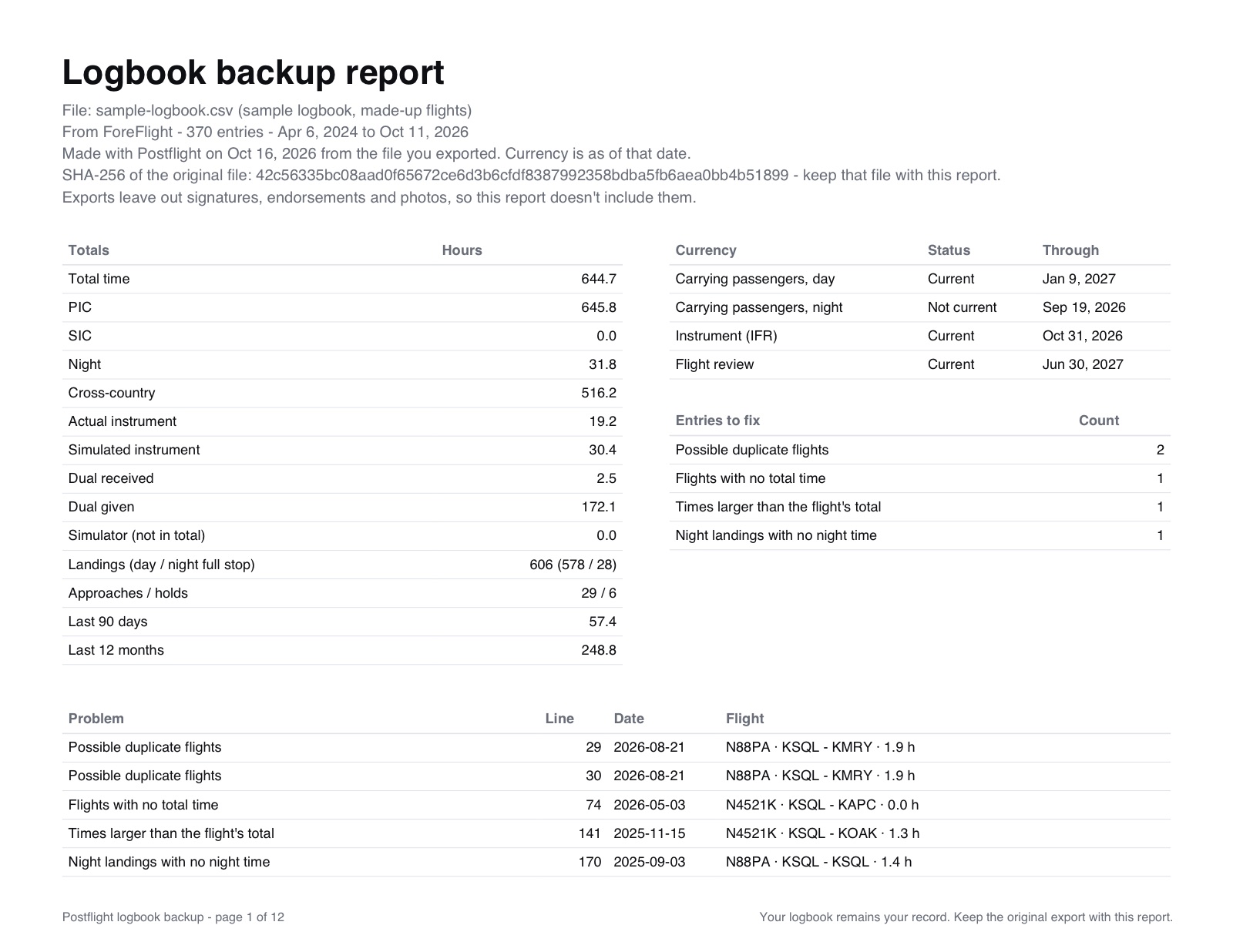
Total, PIC, SIC, night, cross-country, instrument, landings and approaches, plus the last 90 days and 12 months.
Your currency
Day and night passenger currency, IFR currency with its grace period, and your flight review.
Entries to fix
Copied flights, flights with no hours, times bigger than the total, and night landings with no night time.
A backup report
Every flight and every total in one PDF, with a fingerprint of your original file. Keep the two together.
Check your logbook in your account.
Create your account and choose a plan, then import this file. You see every flight before anything is saved, with your totals, your currency and every entry to fix.
The yearly plan starts with 7 days to try it, then $23.99 a year. Or $3.99 a month, or $59.99 once.
Already have an account? Sign in
Reading your logbook…
This happens on your computer and takes a second.
We couldn’t read this file
What the checker looks for.Every check runs on your computer.
Entries to fix
Copied flights
Same date, aircraft, airports and time. Sync problems often save a flight twice.
Flights with no hours
An aircraft, airports or landings, but zero total time, so your totals come up short.
Times bigger than the total
PIC, SIC, night, cross-country, instrument, dual or solo time larger than the flight itself.
Out and in times that don’t match
Block times that disagree with the logged total by more than 0.1 hours.
Night landings with no night time
They only count toward night currency if the flight logged night time.
Approaches with no instrument time
Approaches count for IFR currency only in actual or simulated instrument conditions.
Minutes read as hours, and dates that don’t add up
Flights over 24 hours, dates in the future or unreadable, and flights with no aircraft.
Currency, 14 CFR 61.57 and 61.56
Carrying passengers by day
3 takeoffs and landings in the last 90 days, counted from your third most recent landing.
Carrying passengers at night
3 full-stop landings at night in the last 90 days. If your file doesn’t say they were full stops, the checker tells you.
Instrument (IFR)
6 approaches and holding within 6 calendar months, then the 6-month grace period, then the IPC.
Flight review
Within the last 24 calendar months. A checkride for a new certificate or rating counts too.
Totals work for any logbook. Currency follows US FAA rules; EASA recency isn’t checked yet.
Interviews and checkrides
Walk in with totals you trust.Fix the gaps first.
Airlines and examiners compare the hours on your application with your logbook. Run the check before you fill in the form, fix what it finds in your logbook app, and keep the backup report next to your answers.
- The hours your FAA Form 8710-1 and IACRA ask for, added up for you, including cross-country PIC and night instruction
- Airline application totals: PIC, SIC, multi-engine, night, instrument, time in type and the last 12 months
- Every problem listed with its date and an Edit button, and copied flights deleted in one tap
The report helps you prepare. Your logbook stays the record an airline or examiner looks at.
The app
A logbook you can check yourself.Coming to iPhone and iPad.
Postflight is a new pilot logbook built around one promise: you can always see that every flight is saved. Join the list and you’ll get one email when the TestFlight beta opens.
Pro, with the app included when it ships. Or $3.99 a month, or $59.99 once. See plans
You’re on the list.
We’ll email you once, when the TestFlight beta opens. Thanks for helping shape it.
What the app will do.Planned for the first beta.
- 01
Every flight shows where it’s saved
Each entry says whether it’s on this iPhone, in your iCloud and in your last backup. No guessing after a sync.
- 02
Your whole logbook in one step
Import from LogTen, ForeFlight or MyFlightbook, and see your totals next to your old app’s before you switch.
- 03
A backup you own, every night
A PDF and a CSV land in your Files app each night. They open without Postflight.
- 04
Airline schedules become draft flights
Share your roster PDF. Postflight drafts the flights, and you confirm each one before it counts.
- 05
Currency and totals, always ready
Passenger, night and IFR currency, totals for an 8710 form and time in type, updated as you log.
These are plans, not features you can use today. The checker above works now.
Questions
Still have one?
Is my logbook uploaded anywhere?
When you import it, your flights are saved in your Postflight account so you can open them on any device. Your file is read in your browser first, and you see every flight before anything is saved. Only you can sign in to your logbook, and you can export it as a CSV or delete it any time.
The sample logbook on this page is read in your browser and never leaves it.
For our own counts we only record events such as “a logbook was imported”, which app it came from and rough sizes such as “500 to 999 flights”.
Which files work?
Exports from LogTen, ForeFlight, MyFlightbook, Garmin Pilot and CrewLounge PILOTLOG, Excel files (.xlsx), and most CSV or tab-delimited logbooks that have a row of column names with a date and your times. If a file counts minutes instead of hours, the checker spots it and asks.
Why don’t my totals match my app?
Small differences usually come from rounding, simulator time counted differently, or a filter applied when you exported. A bigger gap is worth a look: start with Possible duplicate flights and Flights with no total time.
Is the currency check official?
No. It’s a quick reading of 14 CFR 61.57 and 61.56 based only on what your file records. A file can’t show everything: whether night landings were full stops, tailwheel full stops, or every category and class. When the file can’t tell, the checker says so. Always confirm with your logbook and the regulations.
Does it follow FAA or EASA rules?
Currency follows US FAA rules (14 CFR 61.57 and 61.56). Totals, time in type and the checks for broken entries work for any logbook. EASA recency isn’t checked yet.
Will an airline accept the backup report?
Use it to prepare, not as your logbook. Airlines and examiners look at the logbook itself, and some don’t accept printouts as the record. The report helps you find and fix problems before they do.
Can I check a paper logbook?
Not directly. The checker needs a file, such as the export from your logbook app or a spreadsheet with a row of column names and one flight per row.
Does this replace my logbook?
It can. Import your logbook once, then add flights as you fly. Your logbook stays your record either way: keep exporting a CSV or PDF backup, so you always have your own copy.
When will the app be out, and what will it cost?
A TestFlight beta opens once enough pilots join the list. Every plan includes it: $3.99 a month, $23.99 a year after a 7-day free trial, or $59.99 once.
Who makes Postflight?
An independent iOS developer. The checker comes first: it shows which logbook problems pilots really have, so the app fixes those.